
How to Download the Audio File from Streaming Video: In this Current Internet world, Streaming Videos plays the important role. Whereas we are now looking our Smartphones and Tablets apart from Television because of your Daily work. Even though sometimes we can’t be able to watch our important programs due to our daily schedules such as on drive, on work, on exercise. Also, nowadays we can update our knowledge of current affairs and our needs via contents on the Internet. In that, Videos also takes most of the task to understand quickly. Here we are going to explain about how to download the audio file from streaming video. It will make your driving, exercise as more worthy hours. Scroll down to learn how to download and convert Audio File from Streaming Video.
Methods of Downloading Audio file from Streaming Video
In this short article, you will learn about, how to download the Audio files from any streaming video. There are many online websites are providing fascinating and useful things with the help of Video. You can able to download those videos as an audio format by using following methods. However, the streaming websites such as YouTube.com, dailymation.com, vimeo.com, facebook.com, and more more. You can download the audio of particular Video from Peggo.co, saveform.net. Also, There are a Lots of Softwares in the online market to download the Video on MP3 format like as Ummy is one of the best software that we recommended. It supports only one Streaming website link; that is a leader for all other Streaming Websites, which is Google’s YouTube.
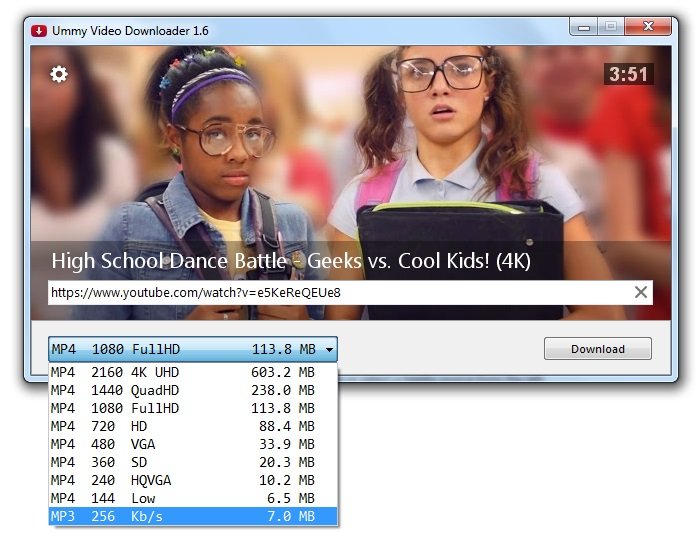
And there are some Browser extensions that will help you to download the video from Online Streaming website. By using that extension, you can download the videos in your PC/Laptop then you can able to change that as MP3/Audio format. For Chrome users, Video Downloader is a good extension. And if you are Firefox user, then DownloadHelper will help you. After the Video Download, use VLC Player to convert the video into audio. Just Follow the given steps bellow.
- Open your VLC Player.
- Click Media on the Toolbar, then click Convert/Save.
- A window opened with the name of “Open Media,” click Add button on the right side of the File Selection Box. Browse your downloaded video file then Click OK.
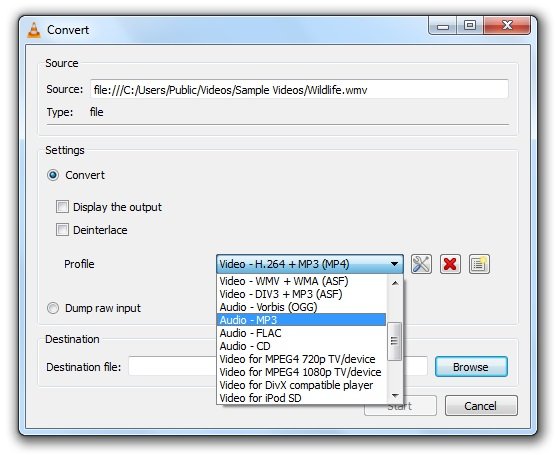
- Choose “Audio-MP3” on the dropdown list box of Profile.
- Browse the Destination File in the destination box, then give a name for your MP3 file, Click Save.
- Click Start
Then the VLC player shows you the progress with transcode on Playback window. After completing the process, you will get your MP3 file for your concern Video.
Stay tuned to learn more on WORLDHAB How To!

