Friday, December 5, 2025
No Result
View All Result
WORLDHAB
  • Business
  • Finance
  • Entertainment
  • Sports
  • Lifestyle
    • Fashion
    • Health
    • Pets
    • Travel
  • Tech
  • Gaming
  • Business
  • Finance
  • Entertainment
  • Sports
  • Lifestyle
    • Fashion
    • Health
    • Pets
    • Travel
  • Tech
  • Gaming
No Result
View All Result
WORLDHAB
No Result
View All Result

How to Remove the Malware from Your PC With the Online Tool

April 24, 2016 - Updated on September 28, 2024
in Technology
Reading Time: 2 mins read
14
0

Learn How to Remove the Malware from Your PC: Some of our PC’s are affected by Malware at sometimes. We need to understand the difference between Malware and Virus as First. Take a guide to Remove the Malware from PC on bellow procedure.
Learn How to Remove the Malware from Your PC

Virus vs Malware Difference

A Virus is also a type of Malware. But the term, Virus is only used by the public users. Malware is affected your Computer because of using any Malicious Software or also because of our mishandling. Malware includes various Virus Software’s such as Trojan horses, Worms, Spyware, Adware and Ransomware. If your PC was affected by Malware means, just follow the things that given bellow.

Remove the Malware from Your PC

Malware has the capability to affect our Computer as well as our Smartphones also. Here you can Learn How to Remove the Malware from Your PC. There were so many methods to clean the Malware from your PC. Here we guided you with the updated method based on 2016 techniques.

Still some of ours believing on our Antivirus Software that we are using on our PCs. Most of Antivirus Programs are have the chances to been compromised. So instead of using Antivirus software, boot into Safe mode and by using cloud-based Malware scanner. By operating in the Safe mode, it reduced the Malware that interfere.

Learn How to enter into the Safe Mode on Windows 7, Windows 8 and 8.1

Also, Learn How to enter into the Safe Mode on Windows 10 in separate Article

Remove the Malware from Your PC By Online Scanners

After enter into on your Desktop by using Safe Mode, open your Browser and get the Online Scanner from ESET. After this, try with http://housecall.trendmicro.com/

You need to copy (Back up) all of yours storage data’s into external Hard device or SSD for your secure reason.
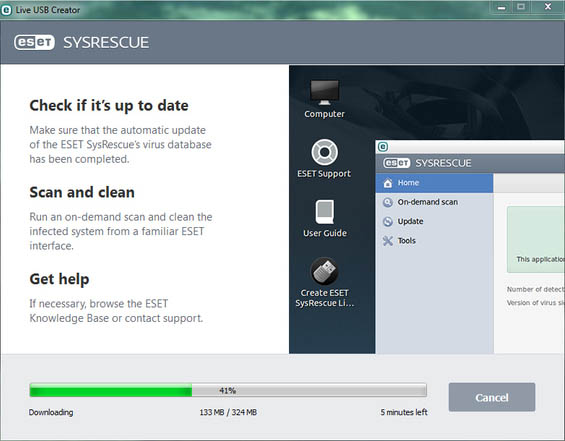
Learn How to Remove the Malware from Your PC

In General, all the Malware creators are not stupid. They introduced lots of New malware by using their intelligent Brain Book and they remain to try to stay on your PC. So, keep your Personal Computer away from Malware.

Stay tuned for more updates on Technology Tricks and tips.

Share6Tweet4SendShare1Pin1Share
Bala

Bala

Santhosh Balaji is a Business and Economics Analyst at WorldHab, where he reports on the companies, trends, and policies shaping the global economy. With over a decade of experience as a business journalist, he specializes in breaking down complex corporate strategies and economic data into clear, actionable insights.Santhosh's work involves deep dives into earnings reports, tracking venture capital trends, and analyzing how regulatory changes impact industries. He is passionate about telling the stories of innovation within the startup ecosystem and providing professionals with the context they need to understand market dynamics. His objective reporting aims to equip readers with a nuanced understanding of the world of business.

Leave a Reply Cancel reply

Your email address will not be published. Required fields are marked *

SEARCH

No Result
View All Result
(adsbygoogle = window.adsbygoogle || []).push({});
  • News
  • About Us
  • Disclaimer
  • Privacy Policy
  • Editorial Policy
  • Contact Us
Email: support@worldhab.com

© 2024 WORLDHAB - Premium WordPress theme by VISION.

Welcome Back!

Login to your account below

Forgotten Password?

Retrieve your password

Please enter your username or email address to reset your password.

Log In
No Result
View All Result
  • Business
  • Finance
  • Entertainment
  • Sports
  • Lifestyle
    • Fashion
    • Health
    • Pets
    • Travel
  • Tech
  • Gaming

© 2024 WORLDHAB - Premium WordPress theme by VISION.

This website uses cookies. By continuing to use this website you are giving consent to cookies being used. Visit our Privacy and Cookie Policy.